FREE ✨Smarticles!✨

Connect with ✨Your Smarticles✨ to get our latest content by email.

Powered by ConvertKit
Showing posts with label behavior management. Show all posts

Starting off new with Klikaklu!!

Start off your new year with his new idea featuring Klikaklu!!   If you like treasure hunts, geocaching or scavenger hunts, you'll LOVE this app that features picture based scavenger hunts!

Picture of klikaklu logo

Klikaklu is a free app for users that wish to participate in a scavenger hunt (i.e., students) and it's $9.99 for someone that wishes to create and share a scavenger hunt...well worth it!!

Klikaklu allows you to create a picture hunt whereby students are provided a written clue and then an image clue and must locate and click the image to get credit!  It's also a terrific way to ask questions about the item they've clicked...you can add multiple choice questions, true/false questions, polls or open ended questions to your hunt!


Here's what you can do with Klikaklu!

The simplest thing I've found that I could do with Klikaklu is to set up stations for students to locate.  Each station has a noteable picture that they must  'click' within the app.  After each image, I insert a question (true/false or multiple choice) at that station for them to answer to demonstrate their knowledge.  I did this with my class while we were going over the classroom policies and procedures to familiarize them with the room as seen in the video above.

Here's the scavenger hunt I made on Klikaklu if you'd like to modify it for YOUR classroom!!

#1.  Daily Doses
Clue: Each day we promise to be loyal to this star spangled banner
Image:  Flag
Question:  T/F  It's ok to talk or remain in your seat during the pledge

#2.  T - Take
Clue:  I sit near the entry just waiting for you, snap a picture of me to complete this clue
Image:  The work basket near the door
Question:  T/F  You need to look in this area daily to pick up any bellwork or materials for class

#3.  Just the Facts
Clue:  Exiting the room, passing this ghost placing a post on me shows who knows the most!
Question:  T/F  When leaving class you may leave as soon as the bell rings.

Picture of Snapfact Exit Slip Board
 
#4.  You're a Sharp One!
Clue:  Sharpen away as long as your teacher has nothing to say!
Image:  Electric pencil sharpener
Question:  None

#5.  Beam Me Up!
Clue:   This portal has all the data you need to keep up with your grades with lightning speed.
Image: The link to the parent/student grade portal
Question:  T/F  Only parents can look at your online grades

#6.  Missed It!
Clue:  Your missed work is found in here, so pick it up and be a dear.
Image:  Absent work bin
Question:  T/F  When you are absent, the class just sits and eats cheese.

#7.  Valued
Clue:  Viking Values 1, 2, 3.  Click this carefully off the wall behind me.
Image:  Classroom Rules poster
Question:  Open ended  Our class rules revolve around the.....?

#8. Offensive
Clue:  Do things right every time so you'll never be a victim of this offensive rhyme!
Image:  Consequences
Question:  T/F  The severe clause means you'll get sent straight to the office

#9 Heads Up!
Clue:  Write it right and things will be all right, right?
Image:  The standard heading for papers
Question:  T/F  It's ok just to write your first name on things.

#10  Check Please
Clue:   If you wish to win something great, make sure you always clear this plate!
Image:  The weekly behavioral assessment sheet  (Free at my TpT Store!)
Question:  T/F  If your assessment sheet stays clean all week, you can play a class game!

#11.  Whoooooo?
Clue:   Owl know the paper is yours if your name is on it!!  If not, you'll find it here.
Image:  No Name Paper Poster with Owl
Question:  None

#12.  It's A Date
Clue:  January, February, March, April, May.  Look here to find out the day.
Image:  Daily agenda area with calendar
Question:  None

How Can I Build this Myself???

Step #1.  Chart your course

Have an idea in mind for your scavenger hunt....think big or think small, either is okay!  It could be a tour of the library or a tour of the school!  Klikaklu allows you to add images (that are to be image matched) and it also lets you assign multiple choice questions, true/false questions, polls or open ended questions to your hunt!  You can even assign a location to your clues so that a student must be standing in that very spot for the trigger to work!!

Step #2.  Click each clue!

Set up your scavenger hunt by opening the Klikaklu app, titling your hunt and snapping a picture of each image you want to include in your hunt.  If you want, you can ask a supplemental question about each student that the hunter will have to answer.

Step #3.  Publish and Promote your hunt!

When the hunt has been built, Klikaklu allows you to print out a QR code directing students to the hunt in order to complete it.   Students just download the FREE Klikaklu app, enter their age (it's OK if they are under 13) and begin.  There IS a log-in feature, but I found it faster to play anonymously.


Create a tour of your school, a scavenger hunt of your community, a getting to know you activity or even turn a test/quiz review into a dynamic and engaging activity!

Good luck, and keep on Using Your Smarticles!


Behavior Management: Always a Homerun!

Spring.  Birds are chirping, flowers are blooming and the grass is turning green.  As a Middle School teacher, naturally, my thoughts turn to.....

Behavior Management!!

As my students progress towards the end of the year, as rambunctious as a rowdy group of baseball fans, I've decided to run a Home run Derby in my class.  Combining a little bit of baseball, some tried and true behavior management techniques and a little bit of technology I've generated a little controlled excitement in my classroom!


 Here's how it works...


#1.  Each student is assessed through assessment sheet that measures their weekly classroom performance.  It rates them on Behavior, Materials, Participation and Homework.  Their goal is to keep it CLEAN each week.  If it's clean....that's a home run!!
(Note:   ClassDojo is GREAT for monitoring student performance using technology.
For more on Class Dojo, see my livebinder

#2.  Students can earn additional home runs (baseball stickers) during the course of the week. They can place the stickers on their assessment sheet.

#3.  Students are combined into 'teams' (Groups of 3 or 4) and select their MLB 'team'....here's a great app for selecting.  (Decide Now)  I included every MLB Baseball Team, printed and laminated a logo for that team.

#4.  Students are then given this roster.  On the roster they must rank themselves based upon the likelihood that they will achieve home run(s) by the end of the week.

#5.  You will note there are 6 spots for players.  Not every group has six students!  Here's where real life comes in.  Provide students with iPads.  Direct them to the statistics for their team.  Encourage them to evaluate player statistics and decide who the home run hitters are for their team.  Students can rank their MLB player in ANY slot.  If they rank them first AND that player hit 3 home runs during the week, they will earn 18 points.

#6.  I run my derby from Friday to Friday with a clean slate each Friday (and a chance to rearrange rosters).  Students decide upon rosters (using the roster sheet above) and points tally up throughout the course of the week.  The winning group earns prizes each Friday!!    

#7.  If you teach multiple classes, and added incentive is to create a total home run challenge....keep a running total of home run points earned by each class and reward the winning class!


To Tally Points

 For the BRAVE TechEd Teacher, this Google Doc is a GREAT way to tally up stats.

#1.  Provide students with an iPad and the link to the form  (I like using a QR Code for this)
#2.  Allow students to work with their groups to enter their 'home runs' or their 'non-home runs'
#3 Use this spreadsheet to aggregate all of the data!  

Google Doc: https://docs.google.com/spreadsheet/ccc?key=0AnAEouy2jvX5dGpialpRWnQ5TUl6cnB2WlZCUm0wRHc&usp=sharing
  • Enter teams and rosters into the Rosters and Scores tab
  • Copy and paste assessment form data into the Assessment Form tab
  • Copy and paste MLB statistics into the Weekly HR Data Tab
  • Watch as the formulas automatically tally and total the scores
  • Declare your winning group!!!


Scoring a home run is TRULY using Your Smarticles!!!


a href="http://www.bloglovin.com/blog/5221921/?claim=7sdh2dan8ka">Follow my blog with Bloglovin

Gladiator Style Classroom Management


The inspiration for this unique classroom management system came from my sons and the years of experience they have had playing battle games such as Pokemon and Yu-Gi-Oh. So, when I was faced with a particularly challenging set of behaviors in my Social Studies classroom AND we were about to study Ancient Rome, I decided to create my own interactive battle game using Gladiators.

Essentially the game is an incentive device whereby positive student behaviors are rewarded with 'coins'. The behaviors I focused on were turning in homework, being prepared, behaving and participating in class. Once students had collected several Roman coins, they were given the option to purchase a part of their Gladiator (arms, legs, helmet, shield, sword, attack points, defense points and health points). The objective for the students was to build the most powerful Gladiator that they could for the Gladiator Games to be held at the end of the marking period.


There was no promise, however, that the most prepared student would be the winner of the battles because the game inherently had a strategy built in. The items they purchased all had different values that applied to the attack, defense or health of their Gladiator. Students were able to select what to 'buy' and purchase it through a fulfillment station. They would then fill in their order forms and put their coin(s) in an envelope.

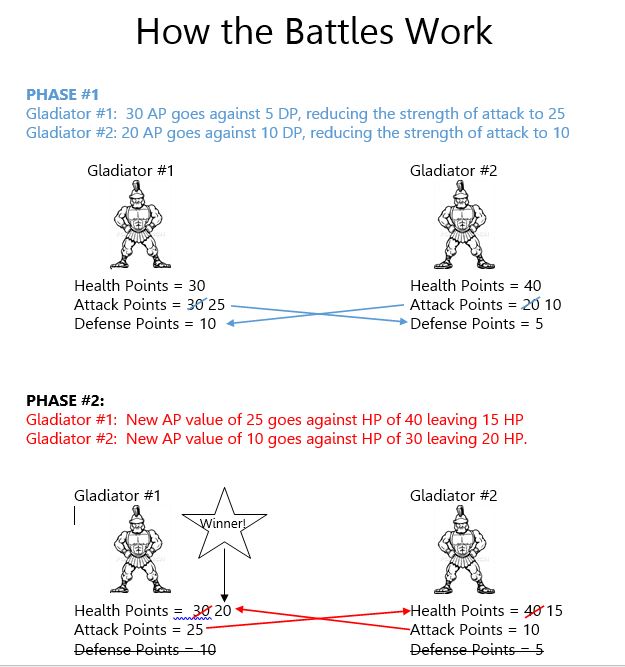
A Brief Look At The Point System


An Attack Sequence


Materials

Gladiator "Parts":  https://drive.google.com/file/d/0B3AEouy2jvX5TG93RTRObmZkV1E/edit?usp=sharing


Gladiator Order Form  https://drive.google.com/file/d/0B3AEouy2jvX5NXRadThac0dLNm8/edit?usp=sharing


Gladiator Attack Auto-Scoring (Excel)  https://drive.google.com/file/d/0B3AEouy2jvX5OVZ3UXlKOEpjTlE/edit?usp=sharing


Now THAT's Using your Smarticles!!


Ancient Rome 


(QR Code Webquest)

Packet contains a QR driven webquest of Ancient Rome. It covers Rome from beginning to end. This works beautifully as a cooperative learning activity with iPad or other devices that can scan QR Codes. Packet can work as a webquest too, as each QR code corresponds with a website link that is included in the packet.

Packet contains a QR driven webquest of Ancient Rome. It covers Rome from beginning to end. This works beautifully as a cooperative learning activity with iPad or other devices that can scan QR Codes. Packet can work as a webquest too, as each QR code is hyperlinked.


Managing Student Behaviors Using Technology


Background

In a middle school environment, communication between classroom teachers can be quite a challenge....especially when attempting to implement a consistent behavior management plan for a student.

Attempted Solution

I often adopt an agenda signing approach with specific students to provide feedback on a student's behavior in my class on a particular day. When targeting SPECIFIC behaviors, I've adopted a 'checklist' that a student carries with him/her throughout the day that ranks specific behaviors and whether or not a student has met the selected criteria.

Continuing to monitoring behavior THROUGHOUT a Middle School with numerous teachers can be onerous. A student must keep track of a 'sheet' and/or remember to request a signature or feedback from every teacher they visit throughout the day. It has been my experience that these systems often fall apart.

The Challenge

Recently I was faced with the challenge of finding a way to elicit teacher responses on a specific student's behavior throughout the day and the student couldn't seem to keep track of the 'checklist' from the beginning of the day to the end. It was then that I turned to technology to help solve the problem. SurveyMonkey was the answer.

The Solution


SurveyMonkey allowed me to create a small survey with a ranking of 1 - 5 to measure a student's behavior in the classroom on a specific day.

The basic survey looked like this:


What was MAGNIFICENT about this approach was the ability then upload e-mails to the site and have SurveyMonkey automatically send a survey invitation to the teachers on the particular student's schedule.

To solve the problem of having to build and initiate a survey every day, I was able to design a month's worth of surveys (you can copy and regenerate the same survey design as many times as you want) and schedule the delivery of the e-mail invitation so that every morning the teacher receives an e-mail invite to the survey. In 2 clicks, the teacher can respond and SurveyMonkey keeps track of the results. Results that can be shared amongst teachers, with the student AND with parents/guardians.

SUMMARY


1. Use SurveyMonkey to create a daily behavior survey for a student
2. Automatically e-mail it to the student's teachers
3. Gather/View/Share results
4. Reward student (or encourage improvement)

Classroom Management - Gladiator Style

When faced with a particularly challenging set of behaviors in my Social Studies classroom AND we were about to study Ancient Rome, I decided to create my own interactive battle game using Gladiators to keep behavior in check and to keep homework rolling in.

Essentially the game is an incentive device whereby positive student behaviors were rewarded with 'coins'. The behaviors I focused on were:


  • Turning in homework
  • Being prepared
  • Participating
  • Doing EXTRA


Once students had collected several Roman coins, they were given the option to purchase a part of their Gladiator (arms, legs, helmet, shield, sword, attack points, defense points and health points). 

The Order Form

The objective for the students was to build the most powerful Gladiator that they could for the Gladiator Games to be held at the end of the marking period.


There was no promise, however, that the most prepared student would be the winner of the battles because the game inherently had a strategy built in. The items they purchased all had different values that applied to the attack, defense or health of their Gladiator. Students were able to select what to 'buy' and purchase it through a fulfillment station. They would then fill in their order forms and put their coin(s) in an envelope.

The Games


An Attack Sequence


Now THAT's Using your Smarticles!!